---
title: "The Lab Savior: A Comprehensive HPLC Troubleshooting Guide"
description: Stuck with high back pressure or tailing peaks? Follow our HPLC troubleshooting guide covering mobile phase, pump, injector, column, and detector.
image: https://blog.seqgen.com/hubfs/hplc-troubleshooting-sketchnote.png
---
- [MARKETPLACE](https://seqgen.com/marketplace/)
- [CAREERS](https://seqgen.com/careers/)
- [TERMS & CONDITIONS](https://seqgen.com/wp-content/uploads/2026/03/POL_011-Rev.A_Terms-and-Conditions-of-Sales-for-Products-and-Services.pdf)
- [ISO 9001 CERTIFICATE](https://seqgen.com/wp-content/uploads/2026/01/SeqGen-Final-Cert_2026-2029.pdf)
- [SALES INQUIRY](https://seqgen.com/sales-inquiry/)
- [SERVICE REQUEST](http://seqgen.com/service-request/)
- [TESTIMONIALS](https://seqgen.com/testimonials/)
[](https://seqgen.com/)
- [SeqMo Rewards](https://seqgen.com/seqmo-rewards/)
- [HOME](https://seqgen.com/)
- [ABOUT US](https://seqgen.com/about-us/)
- [Our History](https://seqgen.com/about-us/our-history-2/)
- [Our Engineers](https://seqgen.com/about-us/our-engineers/)
- INSTRUMENT MODEL
- [LC/MS](https://seqgen.com/instrument-model/lc-ms/)
- [Sciex 3000 system](https://seqgen.com/instrument-model/lc-ms/api-3000/)
- [Sciex 3200 system](https://seqgen.com/instrument-model/lc-ms/api-3200/)
- [Sciex 4000 system](https://seqgen.com/instrument-model/lc-ms/api-4000/)
- [Sciex 4500 system](https://seqgen.com/instrument-model/lc-ms/api-4500/)
- [Sciex 5500 system](https://seqgen.com/instrument-model/lc-ms/api-5500/)
- [Sciex 6500 system](https://seqgen.com/instrument-model/lc-ms/api-6500/)
- [LC systems](https://seqgen.com/instrument-model/lc-ms/lc-systems/)
- [DNA Analyzer](https://seqgen.com/instrument-model/dna-analyzer/)
- [ABI 3100](https://seqgen.com/instrument-model/dna-analyzer/abi-3100/)
- [ABI 3130/3130XL](https://seqgen.com/instrument-model/dna-analyzer/abi-3130-3130xl/)
- [ABI 3500/3500XL](https://seqgen.com/instrument-model/dna-analyzer/abi-3500-3500xl/)
- [ABI 3730/3730XL](https://seqgen.com/instrument-model/dna-analyzer/abi-3730-3500xl/)
- [Real-Time PCR](https://seqgen.com/instrument-model/real-time-pcr/)
- [ABI 7300/7500](https://seqgen.com/instrument-model/real-time-pcr/abi-7300-7500/)
- [ABI 7900](https://seqgen.com/instrument-model/real-time-pcr/abi-7900/)
- [Thermal Cyclers](https://seqgen.com/instrument-model/thermal-cyclers/)
- [ABI 2720](https://seqgen.com/instrument-model/thermal-cyclers/abi-2720-2/)
- [ABI 9700](https://seqgen.com/instrument-model/thermal-cyclers/abi-9700/)
- [ABI 9800](https://seqgen.com/instrument-model/thermal-cyclers/abi-9800/)
- [Liquid Handler](https://seqgen.com/instrument-model/liquid-handler/)
- [Tecan Freedom Evo](https://seqgen.com/instrument-model/liquid-handler/tecan-freedom-evo/)
- [Microplate Reader](https://seqgen.com/instrument-model/microplate-reader/)
- [Coming Soon](https://seqgen.com/instrument-models/microplate-reader/)
- [SALES](https://seqgen.com/sales/)
- [SERVICE](https://seqgen.com/service/)
- [CONTACT](https://seqgen.com/contact/)
- [BLOG](https://blog.seqgen.com)
- [HOME](http://seqgen.com/)
- [ABOUT US](https://seqgen.com/about-us/)
- [Our History](https://seqgen.com/about-us/our-history-2/)
- [Our Engineers](https://seqgen.com/about-us/our-engineers/)
- INSTRUMENT MODEL
- [LC/MS](https://seqgen.com/instrument-model/lc-ms/)
- [Sciex 3000 system](https://seqgen.com/instrument-model/lc-ms/api-3000/)
- [Sciex 3200 system](https://seqgen.com/instrument-model/lc-ms/api-3200/)
- [Sciex 4000 system](https://seqgen.com/instrument-model/lc-ms/api-4000/)
- [Sciex 4500 system](https://seqgen.com/instrument-model/lc-ms/api-4500/)
- [Sciex 5500 system](https://seqgen.com/instrument-model/lc-ms/api-5500/)
- [Sciex 6500 system](https://seqgen.com/instrument-model/lc-ms/api-6500/)
- [DNA ANALYZER](https://seqgen.com/instrument-model/dna-analyzer/)
- [ABI 3100](https://seqgen.com/instrument-model/dna-analyzer/abi-3100/)
- [ABI 3130/3130XL](https://seqgen.com/instrument-model/dna-analyzer/abi-3130-3130xl/)
- [ABI 3500/3500XL](https://seqgen.com/instrument-model/dna-analyzer/abi-3500-3500xl/)
- [ABI 3730/3730XL](https://seqgen.com/instrument-model/dna-analyzer/abi-3730-3500xl/)
- [REAL-TIME PCR](https://seqgen.com/instrument-model/real-time-pcr/)
- [ABI 7300/7500](https://seqgen.com/instrument-model/real-time-pcr/abi-7300-7500/)
- [ABI 7900](https://seqgen.com/instrument-model/real-time-pcr/abi-7900/)
- [THERMAL CYCLERS](https://seqgen.com/instrument-model/thermal-cyclers/)
- [ABI 2720](https://seqgen.com/instrument-model/thermal-cyclers/abi-2720-2/)
- [ABI 9700](https://seqgen.com/instrument-model/thermal-cyclers/abi-9700/)
- [ABI 9800](https://seqgen.com/instrument-model/thermal-cyclers/abi-9800/)
- [LIQUID HANDLER](https://seqgen.com/instrument-model/liquid-handler/)
- [Tecan Freedom Evo](https://seqgen.com/instrument-model/liquid-handler/tecan-freedom-evo/)
- [SALES](https://seqgen.com/sales/)
- [SERVICE](https://seqgen.com/service/)
- [CONTACT](https://seqgen.com/contact/)
- [SERVICE REQUEST](https://seqgen.com/service-request/)
- [SALES INQUIRY](https://seqgen.com/sales-inquiry/)
- [BLOG](https://blog.seqgen.com/)
- [TESTIMONIALS](https://seqgen.com/testimonials/)
- [ISO 9001 CERTIFICATE](https://seqgen.com/wp-content/uploads/2026/01/SeqGen-Final-Cert_2026-2029.pdf)
# The Lab Savior: A Comprehensive HPLC Troubleshooting Guide
09 March 2026
[LC-MS](https://blog.seqgen.com/topic/lc-ms)
[0](https://blog.seqgen.com/the-lab-savior-a-comprehensive-hplc-troubleshooting-guide#comments-listing)
## Quick-Start Diagnostic Summary
If you are currently facing an instrument issue, follow this logical flow to isolate the source: **Mobile Phase → Pump → Injector/Autosampler → Column → Detector**.
- **No Signal?** Verify the detector lamp is ON, check the wavelength setting, and purge the pump to remove air.
- **Pressure Anomalies?** High pressure usually indicates a blocked frit or column; low pressure often suggests a leak or air in the pump heads.
- **Peak Shape Issues?** Address split peaks by replacing the guard column; resolve fronting by reducing injection volume; check fittings for dead volume if peaks are tailing.
- **Retention Time (RT) Shifts?** Stabilize the column oven temperature and ensure the mobile phase is fresh and degassed.
- **Expert Maintenance:** [Contact SeqGen](https://seqgen.com/service-request/) for persistent Sciex MS sensitivity loss, internal Shimadzu failures, or annual Preventive Maintenance (PM)/compliance requirements.
###### [Watch the summary on our YouTube blog channel](https://youtu.be/cKy64AdIk5M)
In the daily routine of High-Performance Liquid Chromatography (HPLC) analysis, instrument "hiccups" are almost a rite of passage for every lab technician. Whether it’s an erratic baseline, pressure spikes, or collapsing peak shapes, these issues don’t just delay your workflow—they compromise the integrity of your data.
At SeqGen, we understand that downtime is the enemy of productivity. We’ve compiled this expert troubleshooting guide based on years of experience with Sciex and Shimadzu systems to help you identify and resolve common issues quickly. We recommend bookmarking this page as a standard reference for your lab bench.
## The Golden Rule of HPLC Troubleshooting
When a problem arises, don't panic. Follow this logical flow to isolate the source: Mobile Phase → Pump → Injector/Autosampler → Column → Detector.
By following this sequence, you can systematically rule out variables and pinpoint the exact cause of your hardware "hiccup". Let’s start with the most common scenarios you'll face at the bench:
##### 1. No Peak / No Signal
This is the most alarming scenario, but it is often related to basic setup or connectivity.
- **Possible Causes:** Detector lamp is OFF or weak; wrong wavelength setting; no actual injection occurred; pump is not delivering mobile phase due to air bubbles.
- **Quick Solutions:** Verify detector lamp status and wavelength.
- Confirm injection volume in the software.
- Purge the pump thoroughly to remove air.
- Check the pressure reading; if it’s 0, verify solvent levels and check for disconnected tubing.
##### 2. Peak Shape Issues: Split, Fronting, or Tailing
- **Split Peaks:** Usually caused by a column void or a contaminated guard column. Try flushing the column or replacing the guard column. Ensure your sample diluent matches your mobile phase.
- **Fronting Peaks:** Often a sign of column overload. Reduce your injection volume or dilute your sample concentration.
- **Tailing Peaks:** The most common headache. This usually stems from column contamination, improper pH (active silanol interactions), or dead volume in the fittings.
- *Tip:* Check all connections. Even a microscopic gap in a fitting can cause significant tailing.
##### 3. Pressure Anomalies: High vs. Low
- **High Back Pressure:** Indicates a blockage. Check the column frit, guard column, or look for microbial growth in aqueous mobile phases.
- *Action:* Flush the system (Water → IPA/ACN) or reverse-flush the column if the manufacturer allows.
- **Low Pressure / Fluctuations:** Typically caused by a leak or air in the pump heads. Tighten loose fittings and check the pump seals. If pressure pulses, your check valves may need cleaning or replacement.
##### 4. Baseline Noise & Retention Time Shift
- **Baseline Noise:** Often due to air bubbles, dirty solvents, or a lamp reaching the end of its lifespan. Ensure all mobile phases are properly degassed and filtered.
- **RT Shift:** This usually points to a change in flow rate or mobile phase composition (e.g., evaporation of organic modifiers). Ensure your column oven temperature is stable and your pump is calibrated.
## When Should You Contact SeqGen?
While the steps above resolve 80% of routine issues, certain deep-seated technical failures require professional intervention. It may be time to call in the experts if you encounter:
- Persistent sensitivity loss in Sciex MS systems that cleaning the interface won't fix.
- Internal leaks or motor failures within Shimadzu units.
- Complex synchronization errors between the LC and the Mass Spec.
- Annual PM or IQ/OQ/PQ certification requirements.
At SeqGen, we specialize in keeping your legacy and high-end systems running like new. Our goal is to ensure your research never stops due to equipment failure. If you’ve followed this guide and the problem persists, our technical team is ready to assist.
## HPLC Troubleshooting Cheat Sheet
Quick Diagnostic Flow: Mobile Phase → Pump → Injector/Autosampler → Column → Detector.
**Problem: Peak Shape & Retention**
| **Symptom** | **Common Causes** | **Immediate Action** |
| --- | --- | --- |
| **Split Peaks** | Column void; Contaminated guard column; Solvent mismatch. | Replace guard column; Ensure sample diluent matches mobile phase. |
| **Tailing Peaks** | Active silanol sites; Dead volume; Column contamination. | Adjust pH; Check/tighten all fittings; Flush column with strong solvent. |
| **Fronting Peaks** | Column overload; Sample concentration too high. | Reduce injection volume; Dilute sample. |
| **RT Shift** | Flow rate change; Temperature fluctuation; Air in pump. | Check for leaks; Stabilize column oven; degas mobile phase. |
**Problem: Pressure & Flow**
| **Symptom** | **Common Causes** | **Immediate Action** |
| --- | --- | --- |
| **High Pressure** | Blocked frit; Plugged column; Precipitated buffer. | Replace guard column/frit; Flush with 100% water (if buffer) then organic. |
| **Low Pressure** | Leak in system; Loose fitting; Pump seal failure. | Tighten fittings; Inspect pump for leaks; Prime pump heads. |
| **Cycling Pressure** | Air bubble in pump; Faulty check valve. | Purge/Prime pump; Sonicate check valves in IPA. |
**Problem: Baseline & Signal**
| **Symptom** | **Common Causes** | **Immediate Action** |
| --- | --- | --- |
| **No Signal** | Lamp OFF; Wrong wavelength; No injection. | Check lamp energy; Verify λ; Confirm autosampler needle stroke. |
| **Baseline Noise** | Air bubbles; Lamp aging; Dirty mobile phase. | Degas solvents; Replace lamp; Filter all mobile phases (0.22μm). |
| **Baseline Drift** | Temperature change; Column bleed; Slow equilibration. | Monitor column oven; Increase equilibration time. |
For a faster diagnostic flow you can keep at your bench, refer to our visual summary below—designed to help you isolate issues from mobile phase to detector at a glance.
## 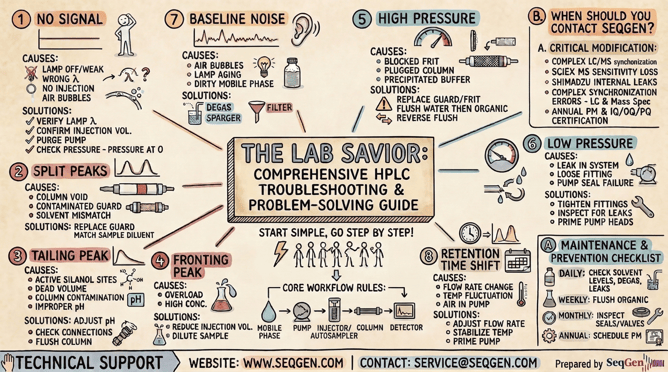*The SeqGen HPLC Troubleshooting Cheat Sheet Sketchnote.*
## Maintenance & Prevention Checklist
Resolving an immediate issue is only half the battle; staying ahead of hardware wear and tear is the key to consistent data. Use the following checklist to build a robust preventative routine in your lab:
- **Daily:** Check solvent levels; degas mobile phase; check for leaks.
- **Weekly:** Flush system with 100% Organic (ACN/IPA) to prevent microbial growth.
- **Monthly:** Inspect pump seals and check valve performance.
- **Annual:** Schedule a SeqGen PM to ensure hardware longevity and IQ/OQ compliance.
## **Technical Support**
If troubleshooting steps do not resolve the issue, or for Sciex/Shimadzu specific hardware failures, please contact our technical support team:
- Website: [seqgen.com](http://www.seqgen.com)
- Service request: [seqgen.com/service-request/](https://seqgen.com/service-request/)
- Email: service@seqgen.com
---
SeqGen specializes in the repair, maintenance, and refurbishment of essential laboratory instruments used in DNA sequencing and genetic research. Our expertise covers a wide range of equipment, including DNA sequencers like the [ABI 3730/3730XL](https://seqgen.com/instrument-model/dna-analyzer/abi-3730-3730xl/), [3500/3500XL](https://seqgen.com/instrument-model/dna-analyzer/abi-3500-3500xl/), SCIEX LC/MS mass spectrometers such as the [SCIEX 6500+](https://seqgen.com/instrument-model/lc-ms/api-6500/), [TECAN Freedom EVO](https://seqgen.com/instrument-model/liquid-handler/tecan-freedom-evo/) liquid handlers, real-time PCR systems, thermal cyclers, and microplate readers. With experience in both current and legacy models, SeqGen provides cost-effective solutions at significantly lower prices than leading competitors.
### Written by [Service Team](https://blog.seqgen.com/author/service-team)
Search this site on Google
Search Google
### Subscribe to Email Updates
## [](https://hubspot-cta-redirect-na2-prod.s3.amazonaws.com/cta/redirect/1939955/32eb2ce8-8e54-4e61-ad50-57f6b9b23d18)
### Recent Posts
### Posts by Topic
- [DNA Analyzer (49)](https://blog.seqgen.com/topic/dna-analyzer)
- [Others (42)](https://blog.seqgen.com/topic/others)
- [Crossword Puzzle (11)](https://blog.seqgen.com/topic/crossword-puzzle)
- [3730 Series Genetic Analyzer (10)](https://blog.seqgen.com/topic/3730-series-genetic-analyzer)
- [Tecan Freedom Evo (10)](https://blog.seqgen.com/topic/tecan-freedom-evo)
- [3500 Series Genetic Analyzer (6)](https://blog.seqgen.com/topic/3500-series-genetic-analyzer)
- [AI 101 (6)](https://blog.seqgen.com/topic/ai-101)
- [Archive (6)](https://blog.seqgen.com/topic/archive)
- [Events/News (6)](https://blog.seqgen.com/topic/events-news)
- [LC-MS (5)](https://blog.seqgen.com/topic/lc-ms)
- [Real-Time PCR (4)](https://blog.seqgen.com/topic/real-time-pcr)
- [3130 Series Genetic Analyzer (2)](https://blog.seqgen.com/topic/3130-series-genetic-analyzer)
see all
### Archives
- [September 2026 (1)](https://blog.seqgen.com/archive/2026/09)
- [August 2026 (1)](https://blog.seqgen.com/archive/2026/08)
- [July 2026 (1)](https://blog.seqgen.com/archive/2026/07)
- [June 2026 (2)](https://blog.seqgen.com/archive/2026/06)
- [March 2026 (2)](https://blog.seqgen.com/archive/2026/03)
- [February 2026 (2)](https://blog.seqgen.com/archive/2026/02)
- [January 2026 (4)](https://blog.seqgen.com/archive/2026/01)
- [December 2025 (3)](https://blog.seqgen.com/archive/2025/12)
- [November 2025 (1)](https://blog.seqgen.com/archive/2025/11)
- [October 2025 (4)](https://blog.seqgen.com/archive/2025/10)
- [September 2025 (5)](https://blog.seqgen.com/archive/2025/09)
- [August 2025 (1)](https://blog.seqgen.com/archive/2025/08)
- [July 2025 (1)](https://blog.seqgen.com/archive/2025/07)
- [June 2025 (2)](https://blog.seqgen.com/archive/2025/06)
- [May 2025 (1)](https://blog.seqgen.com/archive/2025/05)
- [April 2025 (2)](https://blog.seqgen.com/archive/2025/04)
- [March 2025 (2)](https://blog.seqgen.com/archive/2025/03)
- [February 2025 (2)](https://blog.seqgen.com/archive/2025/02)
- [July 2023 (1)](https://blog.seqgen.com/archive/2023/07)
- [May 2023 (1)](https://blog.seqgen.com/archive/2023/05)
- [April 2023 (2)](https://blog.seqgen.com/archive/2023/04)
- [March 2023 (3)](https://blog.seqgen.com/archive/2023/03)
- [October 2022 (1)](https://blog.seqgen.com/archive/2022/10)
- [September 2022 (1)](https://blog.seqgen.com/archive/2022/09)
- [May 2022 (1)](https://blog.seqgen.com/archive/2022/05)
- [February 2022 (3)](https://blog.seqgen.com/archive/2022/02)
- [February 2021 (1)](https://blog.seqgen.com/archive/2021/02)
- [March 2020 (2)](https://blog.seqgen.com/archive/2020/03)
- [December 2019 (1)](https://blog.seqgen.com/archive/2019/12)
- [November 2019 (1)](https://blog.seqgen.com/archive/2019/11)
- [September 2019 (1)](https://blog.seqgen.com/archive/2019/09)
- [June 2019 (1)](https://blog.seqgen.com/archive/2019/06)
- [August 2018 (1)](https://blog.seqgen.com/archive/2018/08)
- [May 2018 (1)](https://blog.seqgen.com/archive/2018/05)
- [April 2018 (1)](https://blog.seqgen.com/archive/2018/04)
- [March 2018 (1)](https://blog.seqgen.com/archive/2018/03)
- [January 2018 (1)](https://blog.seqgen.com/archive/2018/01)
- [December 2017 (1)](https://blog.seqgen.com/archive/2017/12)
- [November 2017 (1)](https://blog.seqgen.com/archive/2017/11)
- [October 2017 (1)](https://blog.seqgen.com/archive/2017/10)
- [September 2017 (1)](https://blog.seqgen.com/archive/2017/09)
- [August 2017 (2)](https://blog.seqgen.com/archive/2017/08)
- [July 2017 (2)](https://blog.seqgen.com/archive/2017/07)
- [June 2017 (2)](https://blog.seqgen.com/archive/2017/06)
- [May 2017 (5)](https://blog.seqgen.com/archive/2017/05)
- [April 2017 (1)](https://blog.seqgen.com/archive/2017/04)
- [March 2017 (5)](https://blog.seqgen.com/archive/2017/03)
- [February 2017 (4)](https://blog.seqgen.com/archive/2017/02)
- [January 2017 (4)](https://blog.seqgen.com/archive/2017/01)
- [December 2016 (3)](https://blog.seqgen.com/archive/2016/12)
- [November 2016 (3)](https://blog.seqgen.com/archive/2016/11)
- [October 2016 (4)](https://blog.seqgen.com/archive/2016/10)
- [September 2016 (3)](https://blog.seqgen.com/archive/2016/09)
- [August 2016 (5)](https://blog.seqgen.com/archive/2016/08)
- [July 2016 (3)](https://blog.seqgen.com/archive/2016/07)
- [June 2016 (3)](https://blog.seqgen.com/archive/2016/06)
- [May 2016 (4)](https://blog.seqgen.com/archive/2016/05)
- [April 2016 (4)](https://blog.seqgen.com/archive/2016/04)
- [March 2016 (4)](https://blog.seqgen.com/archive/2016/03)
- [February 2016 (30)](https://blog.seqgen.com/archive/2016/02)
see all
## Contact Us
#### SeqGen, Inc.
1725 Del Amo Blvd Torrance, CA 90501
#### +1 877 377 3743
#### +1 800 790 4830
#### [info@seqgen.com](mailto:%20info@seqgen.com)
#### Opening Hours
Monday - Friday: 8:30AM PST - 5:30PM PST
## Social Links
-
-
-
-
SeqGen is an independently owned and operated provider of repair services and refurbished laboratory equipment. Any product names, logos, brands, and other trademarks or images featured or referred to within the SeqGen website and/or on any social media forum are the property of their respective trademark holders or OEMs. These trademark holders are not affiliated with SeqGen or its website. These trademark holders do not sponsor or endorse SeqGen or any of its products or comments. The use of any trade name or trademark is for identification and reference purposes only and does not imply any association with the trademark holder of their product brand.
```json
{
"@context" : "https://schema.org",
"@type" : "BlogPosting",
"author" : {
"@type" : "Person",
"name" : "Service Team",
"url" : "https://blog.seqgen.com/author/service-team"
},
"dateModified" : "2026-03-14T06:24:35.232Z",
"datePublished" : "2026-03-09T13:00:00.000Z",
"headline" : "The Lab Savior: A Comprehensive HPLC Troubleshooting Guide",
"image" : [ "https://blog.seqgen.com/hubfs/hplc-troubleshooting-sketchnote.png" ],
"mainEntityOfPage" : {
"@id" : "https://blog.seqgen.com/the-lab-savior-a-comprehensive-hplc-troubleshooting-guide",
"@type" : "WebPage"
},
"publisher" : {
"@type" : "Organization",
"logo" : {
"@type" : "ImageObject",
"url" : "https://blog.seqgen.com/hubfs/SmallLogo-2.png"
},
"name" : "SeqGen, Inc."
}
}
```