---
title: "Troubleshooting Tecan Liquid Handling: Solving the \"Mystery Drip\""
description: Stop stray droplets from ruining Tecan runs. Diagnose leaks, purge air, and master EVOware liquid classes to ensure data integrity and a clean deck.
image: https://blog.seqgen.com/hubfs/tecan-droplet-issue-1.png
---
- [MARKETPLACE](https://seqgen.com/marketplace/)
- [CAREERS](https://seqgen.com/careers/)
- [TERMS & CONDITIONS](https://seqgen.com/wp-content/uploads/2026/03/POL_011-Rev.A_Terms-and-Conditions-of-Sales-for-Products-and-Services.pdf)
- [ISO 9001 CERTIFICATE](https://seqgen.com/wp-content/uploads/2026/01/SeqGen-Final-Cert_2026-2029.pdf)
- [SALES INQUIRY](https://seqgen.com/sales-inquiry/)
- [SERVICE REQUEST](http://seqgen.com/service-request/)
- [TESTIMONIALS](https://seqgen.com/testimonials/)
[](https://seqgen.com/)
- [SeqMo Rewards](https://seqgen.com/seqmo-rewards/)
- [HOME](https://seqgen.com/)
- [ABOUT US](https://seqgen.com/about-us/)
- [Our History](https://seqgen.com/about-us/our-history-2/)
- [Our Engineers](https://seqgen.com/about-us/our-engineers/)
- INSTRUMENT MODEL
- [LC/MS](https://seqgen.com/instrument-model/lc-ms/)
- [Sciex 3000 system](https://seqgen.com/instrument-model/lc-ms/api-3000/)
- [Sciex 3200 system](https://seqgen.com/instrument-model/lc-ms/api-3200/)
- [Sciex 4000 system](https://seqgen.com/instrument-model/lc-ms/api-4000/)
- [Sciex 4500 system](https://seqgen.com/instrument-model/lc-ms/api-4500/)
- [Sciex 5500 system](https://seqgen.com/instrument-model/lc-ms/api-5500/)
- [Sciex 6500 system](https://seqgen.com/instrument-model/lc-ms/api-6500/)
- [LC systems](https://seqgen.com/instrument-model/lc-ms/lc-systems/)
- [DNA Analyzer](https://seqgen.com/instrument-model/dna-analyzer/)
- [ABI 3100](https://seqgen.com/instrument-model/dna-analyzer/abi-3100/)
- [ABI 3130/3130XL](https://seqgen.com/instrument-model/dna-analyzer/abi-3130-3130xl/)
- [ABI 3500/3500XL](https://seqgen.com/instrument-model/dna-analyzer/abi-3500-3500xl/)
- [ABI 3730/3730XL](https://seqgen.com/instrument-model/dna-analyzer/abi-3730-3500xl/)
- [Real-Time PCR](https://seqgen.com/instrument-model/real-time-pcr/)
- [ABI 7300/7500](https://seqgen.com/instrument-model/real-time-pcr/abi-7300-7500/)
- [ABI 7900](https://seqgen.com/instrument-model/real-time-pcr/abi-7900/)
- [Thermal Cyclers](https://seqgen.com/instrument-model/thermal-cyclers/)
- [ABI 2720](https://seqgen.com/instrument-model/thermal-cyclers/abi-2720-2/)
- [ABI 9700](https://seqgen.com/instrument-model/thermal-cyclers/abi-9700/)
- [ABI 9800](https://seqgen.com/instrument-model/thermal-cyclers/abi-9800/)
- [Liquid Handler](https://seqgen.com/instrument-model/liquid-handler/)
- [Tecan Freedom Evo](https://seqgen.com/instrument-model/liquid-handler/tecan-freedom-evo/)
- [Microplate Reader](https://seqgen.com/instrument-model/microplate-reader/)
- [Coming Soon](https://seqgen.com/instrument-models/microplate-reader/)
- [SALES](https://seqgen.com/sales/)
- [SERVICE](https://seqgen.com/service/)
- [CONTACT](https://seqgen.com/contact/)
- [BLOG](https://blog.seqgen.com)
- [HOME](http://seqgen.com/)
- [ABOUT US](https://seqgen.com/about-us/)
- [Our History](https://seqgen.com/about-us/our-history-2/)
- [Our Engineers](https://seqgen.com/about-us/our-engineers/)
- INSTRUMENT MODEL
- [LC/MS](https://seqgen.com/instrument-model/lc-ms/)
- [Sciex 3000 system](https://seqgen.com/instrument-model/lc-ms/api-3000/)
- [Sciex 3200 system](https://seqgen.com/instrument-model/lc-ms/api-3200/)
- [Sciex 4000 system](https://seqgen.com/instrument-model/lc-ms/api-4000/)
- [Sciex 4500 system](https://seqgen.com/instrument-model/lc-ms/api-4500/)
- [Sciex 5500 system](https://seqgen.com/instrument-model/lc-ms/api-5500/)
- [Sciex 6500 system](https://seqgen.com/instrument-model/lc-ms/api-6500/)
- [DNA ANALYZER](https://seqgen.com/instrument-model/dna-analyzer/)
- [ABI 3100](https://seqgen.com/instrument-model/dna-analyzer/abi-3100/)
- [ABI 3130/3130XL](https://seqgen.com/instrument-model/dna-analyzer/abi-3130-3130xl/)
- [ABI 3500/3500XL](https://seqgen.com/instrument-model/dna-analyzer/abi-3500-3500xl/)
- [ABI 3730/3730XL](https://seqgen.com/instrument-model/dna-analyzer/abi-3730-3500xl/)
- [REAL-TIME PCR](https://seqgen.com/instrument-model/real-time-pcr/)
- [ABI 7300/7500](https://seqgen.com/instrument-model/real-time-pcr/abi-7300-7500/)
- [ABI 7900](https://seqgen.com/instrument-model/real-time-pcr/abi-7900/)
- [THERMAL CYCLERS](https://seqgen.com/instrument-model/thermal-cyclers/)
- [ABI 2720](https://seqgen.com/instrument-model/thermal-cyclers/abi-2720-2/)
- [ABI 9700](https://seqgen.com/instrument-model/thermal-cyclers/abi-9700/)
- [ABI 9800](https://seqgen.com/instrument-model/thermal-cyclers/abi-9800/)
- [LIQUID HANDLER](https://seqgen.com/instrument-model/liquid-handler/)
- [Tecan Freedom Evo](https://seqgen.com/instrument-model/liquid-handler/tecan-freedom-evo/)
- [SALES](https://seqgen.com/sales/)
- [SERVICE](https://seqgen.com/service/)
- [CONTACT](https://seqgen.com/contact/)
- [SERVICE REQUEST](https://seqgen.com/service-request/)
- [SALES INQUIRY](https://seqgen.com/sales-inquiry/)
- [BLOG](https://blog.seqgen.com/)
- [TESTIMONIALS](https://seqgen.com/testimonials/)
- [ISO 9001 CERTIFICATE](https://seqgen.com/wp-content/uploads/2026/01/SeqGen-Final-Cert_2026-2029.pdf)
# Troubleshooting Tecan Liquid Handling: Solving the "Mystery Drip"
09 January 2026
[Tecan Freedom Evo](https://blog.seqgen.com/topic/tecan-freedom-evo)
[0](https://blog.seqgen.com/troubleshooting-tecan-liquid-handling-solving-the-mystery-drip#comments-listing)
## 
## \[Quick Answer\]
Is your Tecan system dripping? Follow these four priority steps:
- **Clear Air Bubbles:** Run a Flush command (15mL Waste / 20mL Cleaner) via Direct Commands to eliminate bubbles from the liquid system.
- **Check Hardware:** If droplets occur after flushing, or are seen before power-on/during stand-by, check for air accumulation in the Source tank, FAWA pump, 3-way valve fittings, and syringes. Check the tightness of all fittings on the 3-way valves and syringes.
- **Check for Clogs:** If a water drop stays on the tip specifically after flushing, inspect for a clogged probe or clogged fixed tip.
- **Adjust Software:** If droplets only occur after dispensing (at the plate or waste), lower the Z-dispense height or adjust Liquid Class airgaps.
## Why is my deck wet?
In a high-throughput lab, precision and accuracy are the pillars of data integrity. A stray droplet is more than a mess—it’s a volumetric error and a contamination risk.
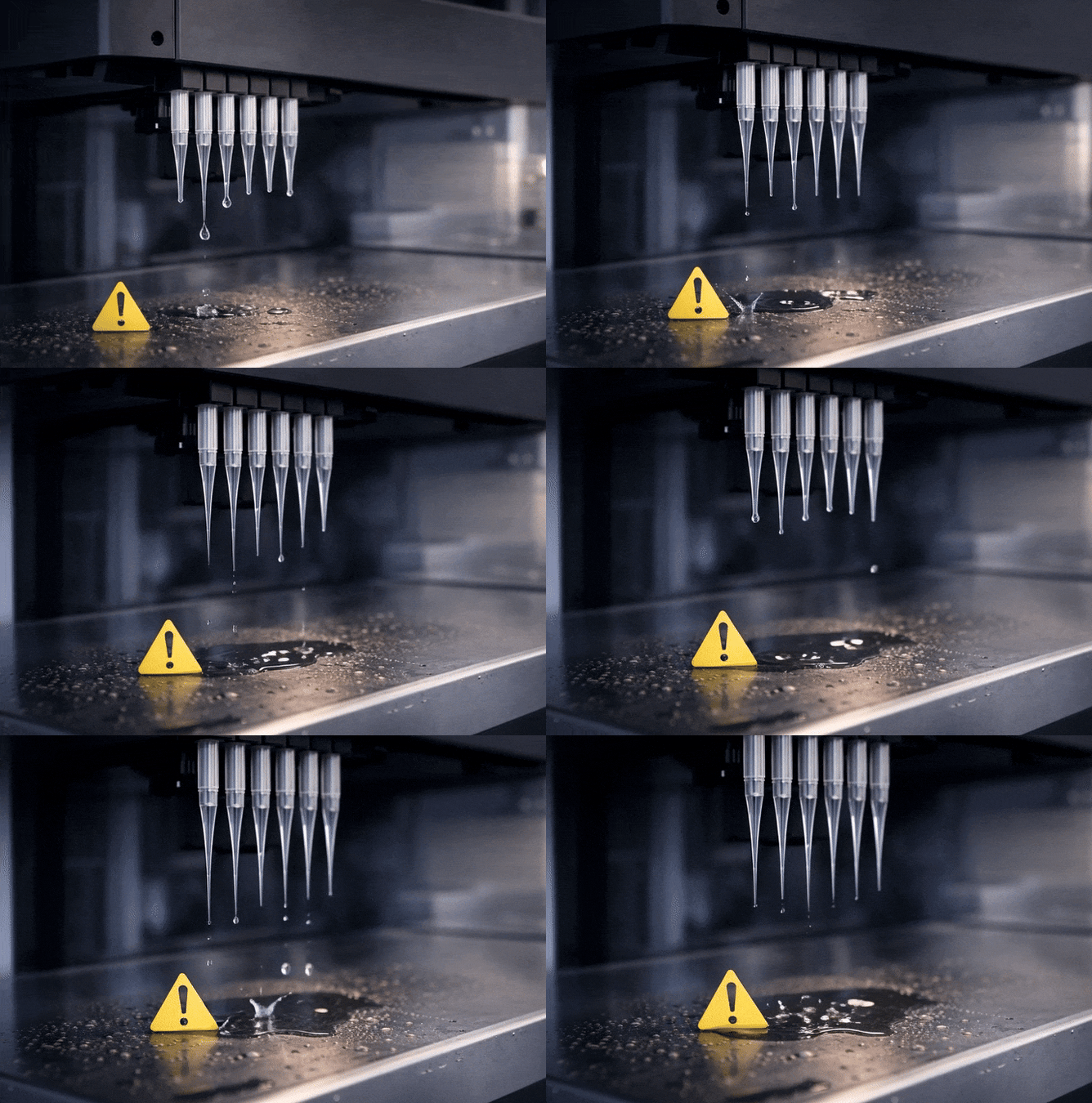
If you notice droplets on your fixed tips or DiTi cones during stand-by mode—or even before switching the instrument on—your liquid system is likely leaking. Once a run begins, this issue often manifests as a droplet dripping onto the worktable during waste container dispensing. If this occurs during every script run, the system requires troubleshooting to ensure volumetric accuracy and prevent sample contamination.
## Phase 1: Eliminating Air Bubbles (The Flush Command)
Air is the most common culprit for dripping because it is compressible. Unlike liquid, which is rigid in a closed system, trapped air acts like a spring. When the syringe pump stops, the compressed air expands, forcing a "weeping" droplet out of the tip.
The Resolution: Before running your script, use the “Flush” command under the “Direct” command section to eliminate bubbles:
- Set Volume in Waste to 15 mL.
- Set Volume in Cleaner to 20 mL.
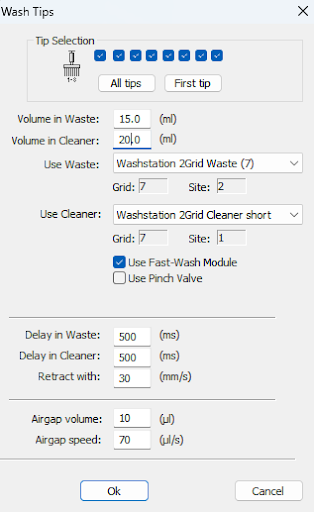
Ensure a sufficient amount of water is flushed through the channel to eliminate all bubbles from the liquid system before re-running the script. This step alone often resolves the dripping issue.
## Phase 2: Identifying the "Where" and "When"
If the dripping persists after a flush, you must isolate the source of the droplet. Observe if the droplet is accumulating on the DiTi Tip or Fixed Tip after the instrument is initialized. Ask these three diagnostic questions:
Q1: Does the droplet occur after the flushing water command?
If Yes: You must check for air accumulation or clogs.
- **For Air:** You need to check where the leakage (accumulating air bubbles) occurs within the liquid system. Inspect the Source tank, FAWA Pump, tubing fitting inlets and outlets from the 3-way valves on the diluter, and the syringes. Additionally, check the tightness of all fittings on the 3-way valve and the syringe to ensure an airtight seal.
- **For Clogs:** If a water drop remains on the tip immediately after flushing, it may be caused by a clogged probe or clogged fixed tip.
Q2: Was the droplet carried over from the microplate after dispensing?
Q3: Does the droplet occur after dispensing everything into the waste container?
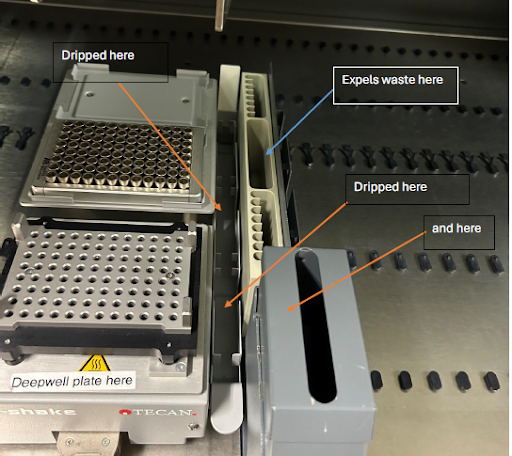
If Yes to Q2 or Q3: You may need to lower the Z-dispense position or make adjustments regarding the Liquid Class (e.g., trailing air gap, leading air gap, or relevant dispensing actions).
## Phase 3: Applying Adjustments
If Phase 2 isolated the issue to the dispensing (Q2 or Q3), follow these steps to adjust your software parameters in EVOware:
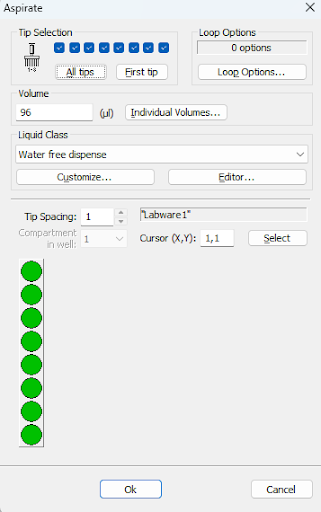
1. **Access the Editor:** Double-click the **Aspirate/Dispense** command. Select **"Editor..."** under the liquid class section.
2. **Identify Category:** Choose the volume category matching your volume (e.g., Standard <15.01-500.01uL>).
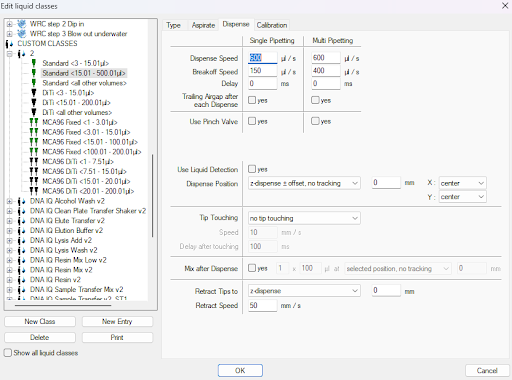
3. **Adjust Airgap:** Within the editor window, you can adjust the airgap volume within Aspirate, or check the box for "Trailing Airgap after each Dispense" under the Dispense tab.
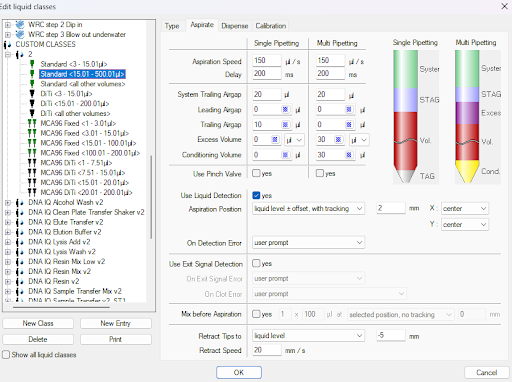

4. **Save:** Press OK to save the settings.
Crucial Note on Liquid Classes
The "Water Free Dispense" is the default liquid class; you will not be able to change these default classes. To make adjustments, you must either:
- Duplicate the liquid class you are using (save it as a different name).
- Use existing Custom classes (for example: LC\_Aspirate 1,LC \_Aspirate 2, and LC\_Dispense 1).
Please try duplicating these classes and then make the necessary changes to the new ones without modifying the originals. Important: Make sure to select the desired liquid class within all aspirate and dispense commands under the liquid class sections.
## Phase 4: Resolution for Clogged Tips/Probes
If your diagnosis points to a blockage (Q1), follow this hierarchy of cleaning to restore "patency" (an unobstructed path) for the liquid. follow this decontamination and rinsing protocol to clear the fluid path:
1. **Chemical Soak**
- Flush the system thoroughly using a Liquinox solution.
- Retain the solution within the tubing and the probe.
- Allow the system to soak for exactly one hour to ensure proper decontamination.
2. **DITI Water Rinse**
- Flush the system with DI water from the source tank.
- Continue rinsing until all air bubbles have been completely removed from the tubing system.
- Verify that the fluid path is clear and bubble-free before proceeding to the next operation
3. **Clearing:** If the orifice remains blocked, use the cleaning needle (found in your Tecan Accessory Box) to gently clear the path.
4. **Flush:** Immediately after using the needle, run a System Flush (15mL/20mL) to ensure any dislodged particles are washed out of the probe and into the waste.
---
SeqGen specializes in the repair, maintenance, and refurbishment of essential laboratory instruments used in DNA sequencing and genetic research. Our expertise covers a wide range of equipment, including DNA sequencers like the [ABI 3730/3730XL](https://seqgen.com/instrument-model/dna-analyzer/abi-3730-3730xl/), [3500/3500XL](https://seqgen.com/instrument-model/dna-analyzer/abi-3500-3500xl/), SCIEX LC/MS mass spectrometers such as the [SCIEX 6500+](https://seqgen.com/instrument-model/lc-ms/api-6500/), [TECAN Freedom EVO](https://seqgen.com/instrument-model/liquid-handler/tecan-freedom-evo/) liquid handlers, real-time PCR systems, thermal cyclers, and microplate readers. With experience in both current and legacy models, SeqGen provides cost-effective solutions at significantly lower prices than leading competitors.
### Written by [Service Team](https://blog.seqgen.com/author/service-team)
Search this site on Google
Search Google
### Subscribe to Email Updates
## [](https://hubspot-cta-redirect-na2-prod.s3.amazonaws.com/cta/redirect/1939955/32eb2ce8-8e54-4e61-ad50-57f6b9b23d18)
### Recent Posts
### Posts by Topic
- [DNA Analyzer (49)](https://blog.seqgen.com/topic/dna-analyzer)
- [Others (42)](https://blog.seqgen.com/topic/others)
- [Crossword Puzzle (11)](https://blog.seqgen.com/topic/crossword-puzzle)
- [3730 Series Genetic Analyzer (10)](https://blog.seqgen.com/topic/3730-series-genetic-analyzer)
- [Tecan Freedom Evo (9)](https://blog.seqgen.com/topic/tecan-freedom-evo)
- [AI 101 (6)](https://blog.seqgen.com/topic/ai-101)
- [Archive (6)](https://blog.seqgen.com/topic/archive)
- [Events/News (6)](https://blog.seqgen.com/topic/events-news)
- [3500 Series Genetic Analyzer (5)](https://blog.seqgen.com/topic/3500-series-genetic-analyzer)
- [LC-MS (5)](https://blog.seqgen.com/topic/lc-ms)
- [Real-Time PCR (4)](https://blog.seqgen.com/topic/real-time-pcr)
- [3130 Series Genetic Analyzer (2)](https://blog.seqgen.com/topic/3130-series-genetic-analyzer)
see all
### Archives
- [July 2026 (1)](https://blog.seqgen.com/archive/2026/07)
- [June 2026 (2)](https://blog.seqgen.com/archive/2026/06)
- [March 2026 (2)](https://blog.seqgen.com/archive/2026/03)
- [February 2026 (2)](https://blog.seqgen.com/archive/2026/02)
- [January 2026 (4)](https://blog.seqgen.com/archive/2026/01)
- [December 2025 (3)](https://blog.seqgen.com/archive/2025/12)
- [November 2025 (1)](https://blog.seqgen.com/archive/2025/11)
- [October 2025 (4)](https://blog.seqgen.com/archive/2025/10)
- [September 2025 (5)](https://blog.seqgen.com/archive/2025/09)
- [August 2025 (1)](https://blog.seqgen.com/archive/2025/08)
- [July 2025 (1)](https://blog.seqgen.com/archive/2025/07)
- [June 2025 (2)](https://blog.seqgen.com/archive/2025/06)
- [May 2025 (1)](https://blog.seqgen.com/archive/2025/05)
- [April 2025 (2)](https://blog.seqgen.com/archive/2025/04)
- [March 2025 (2)](https://blog.seqgen.com/archive/2025/03)
- [February 2025 (2)](https://blog.seqgen.com/archive/2025/02)
- [July 2023 (1)](https://blog.seqgen.com/archive/2023/07)
- [May 2023 (1)](https://blog.seqgen.com/archive/2023/05)
- [April 2023 (2)](https://blog.seqgen.com/archive/2023/04)
- [March 2023 (3)](https://blog.seqgen.com/archive/2023/03)
- [October 2022 (1)](https://blog.seqgen.com/archive/2022/10)
- [September 2022 (1)](https://blog.seqgen.com/archive/2022/09)
- [May 2022 (1)](https://blog.seqgen.com/archive/2022/05)
- [February 2022 (3)](https://blog.seqgen.com/archive/2022/02)
- [February 2021 (1)](https://blog.seqgen.com/archive/2021/02)
- [March 2020 (2)](https://blog.seqgen.com/archive/2020/03)
- [December 2019 (1)](https://blog.seqgen.com/archive/2019/12)
- [November 2019 (1)](https://blog.seqgen.com/archive/2019/11)
- [September 2019 (1)](https://blog.seqgen.com/archive/2019/09)
- [June 2019 (1)](https://blog.seqgen.com/archive/2019/06)
- [August 2018 (1)](https://blog.seqgen.com/archive/2018/08)
- [May 2018 (1)](https://blog.seqgen.com/archive/2018/05)
- [April 2018 (1)](https://blog.seqgen.com/archive/2018/04)
- [March 2018 (1)](https://blog.seqgen.com/archive/2018/03)
- [January 2018 (1)](https://blog.seqgen.com/archive/2018/01)
- [December 2017 (1)](https://blog.seqgen.com/archive/2017/12)
- [November 2017 (1)](https://blog.seqgen.com/archive/2017/11)
- [October 2017 (1)](https://blog.seqgen.com/archive/2017/10)
- [September 2017 (1)](https://blog.seqgen.com/archive/2017/09)
- [August 2017 (2)](https://blog.seqgen.com/archive/2017/08)
- [July 2017 (2)](https://blog.seqgen.com/archive/2017/07)
- [June 2017 (2)](https://blog.seqgen.com/archive/2017/06)
- [May 2017 (5)](https://blog.seqgen.com/archive/2017/05)
- [April 2017 (1)](https://blog.seqgen.com/archive/2017/04)
- [March 2017 (5)](https://blog.seqgen.com/archive/2017/03)
- [February 2017 (4)](https://blog.seqgen.com/archive/2017/02)
- [January 2017 (4)](https://blog.seqgen.com/archive/2017/01)
- [December 2016 (3)](https://blog.seqgen.com/archive/2016/12)
- [November 2016 (3)](https://blog.seqgen.com/archive/2016/11)
- [October 2016 (4)](https://blog.seqgen.com/archive/2016/10)
- [September 2016 (3)](https://blog.seqgen.com/archive/2016/09)
- [August 2016 (5)](https://blog.seqgen.com/archive/2016/08)
- [July 2016 (3)](https://blog.seqgen.com/archive/2016/07)
- [June 2016 (3)](https://blog.seqgen.com/archive/2016/06)
- [May 2016 (4)](https://blog.seqgen.com/archive/2016/05)
- [April 2016 (4)](https://blog.seqgen.com/archive/2016/04)
- [March 2016 (4)](https://blog.seqgen.com/archive/2016/03)
- [February 2016 (30)](https://blog.seqgen.com/archive/2016/02)
see all
## Contact Us
#### SeqGen, Inc.
1725 Del Amo Blvd Torrance, CA 90501
#### +1 877 377 3743
#### +1 800 790 4830
#### [info@seqgen.com](mailto:%20info@seqgen.com)
#### Opening Hours
Monday - Friday: 8:30AM PST - 5:30PM PST
## Social Links
-
-
-
-
SeqGen is an independently owned and operated provider of repair services and refurbished laboratory equipment. Any product names, logos, brands, and other trademarks or images featured or referred to within the SeqGen website and/or on any social media forum are the property of their respective trademark holders or OEMs. These trademark holders are not affiliated with SeqGen or its website. These trademark holders do not sponsor or endorse SeqGen or any of its products or comments. The use of any trade name or trademark is for identification and reference purposes only and does not imply any association with the trademark holder of their product brand.
```json
{
"@context" : "https://schema.org",
"@type" : "BlogPosting",
"author" : {
"@type" : "Person",
"name" : "Service Team",
"url" : "https://blog.seqgen.com/author/service-team"
},
"dateModified" : "2026-03-14T06:15:27.006Z",
"datePublished" : "2026-01-09T14:00:00.000Z",
"headline" : "Troubleshooting Tecan Liquid Handling: Solving the \"Mystery Drip\"",
"image" : [ "https://blog.seqgen.com/hubfs/tecan-droplet-issue-1.png" ],
"mainEntityOfPage" : {
"@id" : "https://blog.seqgen.com/troubleshooting-tecan-liquid-handling-solving-the-mystery-drip",
"@type" : "WebPage"
},
"publisher" : {
"@type" : "Organization",
"logo" : {
"@type" : "ImageObject",
"url" : "https://blog.seqgen.com/hubfs/SmallLogo-2.png"
},
"name" : "SeqGen, Inc."
}
}
```