---
title: "Troubleshooting the Tecan Doorlock Error: EVO_EVO_013_003"
description: Troubleshoot Tecan error EVO_EVO_013_003 or Doorlock 2 not activated. Learn to realign the pin hole with an Allen wrench or when to replace the assembly.
image: https://blog.seqgen.com/hubfs/tecan-door-lock-EVO_EVO_013_003-error.jpeg
---
- [MARKETPLACE](https://seqgen.com/marketplace/)
- [CAREERS](https://seqgen.com/careers/)
- [TERMS & CONDITIONS](https://seqgen.com/wp-content/uploads/2026/03/POL_011-Rev.A_Terms-and-Conditions-of-Sales-for-Products-and-Services.pdf)
- [ISO 9001 CERTIFICATE](https://seqgen.com/wp-content/uploads/2026/01/SeqGen-Final-Cert_2026-2029.pdf)
- [SALES INQUIRY](https://seqgen.com/sales-inquiry/)
- [SERVICE REQUEST](http://seqgen.com/service-request/)
- [TESTIMONIALS](https://seqgen.com/testimonials/)
[](https://seqgen.com/)
- [SeqMo Rewards](https://seqgen.com/seqmo-rewards/)
- [HOME](https://seqgen.com/)
- [ABOUT US](https://seqgen.com/about-us/)
- [Our History](https://seqgen.com/about-us/our-history-2/)
- [Our Engineers](https://seqgen.com/about-us/our-engineers/)
- INSTRUMENT MODEL
- [LC/MS](https://seqgen.com/instrument-model/lc-ms/)
- [Sciex 3000 system](https://seqgen.com/instrument-model/lc-ms/api-3000/)
- [Sciex 3200 system](https://seqgen.com/instrument-model/lc-ms/api-3200/)
- [Sciex 4000 system](https://seqgen.com/instrument-model/lc-ms/api-4000/)
- [Sciex 4500 system](https://seqgen.com/instrument-model/lc-ms/api-4500/)
- [Sciex 5500 system](https://seqgen.com/instrument-model/lc-ms/api-5500/)
- [Sciex 6500 system](https://seqgen.com/instrument-model/lc-ms/api-6500/)
- [LC systems](https://seqgen.com/instrument-model/lc-ms/lc-systems/)
- [DNA Analyzer](https://seqgen.com/instrument-model/dna-analyzer/)
- [ABI 3100](https://seqgen.com/instrument-model/dna-analyzer/abi-3100/)
- [ABI 3130/3130XL](https://seqgen.com/instrument-model/dna-analyzer/abi-3130-3130xl/)
- [ABI 3500/3500XL](https://seqgen.com/instrument-model/dna-analyzer/abi-3500-3500xl/)
- [ABI 3730/3730XL](https://seqgen.com/instrument-model/dna-analyzer/abi-3730-3500xl/)
- [Real-Time PCR](https://seqgen.com/instrument-model/real-time-pcr/)
- [ABI 7300/7500](https://seqgen.com/instrument-model/real-time-pcr/abi-7300-7500/)
- [ABI 7900](https://seqgen.com/instrument-model/real-time-pcr/abi-7900/)
- [Thermal Cyclers](https://seqgen.com/instrument-model/thermal-cyclers/)
- [ABI 2720](https://seqgen.com/instrument-model/thermal-cyclers/abi-2720-2/)
- [ABI 9700](https://seqgen.com/instrument-model/thermal-cyclers/abi-9700/)
- [ABI 9800](https://seqgen.com/instrument-model/thermal-cyclers/abi-9800/)
- [Liquid Handler](https://seqgen.com/instrument-model/liquid-handler/)
- [Tecan Freedom Evo](https://seqgen.com/instrument-model/liquid-handler/tecan-freedom-evo/)
- [Microplate Reader](https://seqgen.com/instrument-model/microplate-reader/)
- [Coming Soon](https://seqgen.com/instrument-models/microplate-reader/)
- [SALES](https://seqgen.com/sales/)
- [SERVICE](https://seqgen.com/service/)
- [CONTACT](https://seqgen.com/contact/)
- [BLOG](https://blog.seqgen.com)
- [HOME](http://seqgen.com/)
- [ABOUT US](https://seqgen.com/about-us/)
- [Our History](https://seqgen.com/about-us/our-history-2/)
- [Our Engineers](https://seqgen.com/about-us/our-engineers/)
- INSTRUMENT MODEL
- [LC/MS](https://seqgen.com/instrument-model/lc-ms/)
- [Sciex 3000 system](https://seqgen.com/instrument-model/lc-ms/api-3000/)
- [Sciex 3200 system](https://seqgen.com/instrument-model/lc-ms/api-3200/)
- [Sciex 4000 system](https://seqgen.com/instrument-model/lc-ms/api-4000/)
- [Sciex 4500 system](https://seqgen.com/instrument-model/lc-ms/api-4500/)
- [Sciex 5500 system](https://seqgen.com/instrument-model/lc-ms/api-5500/)
- [Sciex 6500 system](https://seqgen.com/instrument-model/lc-ms/api-6500/)
- [DNA ANALYZER](https://seqgen.com/instrument-model/dna-analyzer/)
- [ABI 3100](https://seqgen.com/instrument-model/dna-analyzer/abi-3100/)
- [ABI 3130/3130XL](https://seqgen.com/instrument-model/dna-analyzer/abi-3130-3130xl/)
- [ABI 3500/3500XL](https://seqgen.com/instrument-model/dna-analyzer/abi-3500-3500xl/)
- [ABI 3730/3730XL](https://seqgen.com/instrument-model/dna-analyzer/abi-3730-3500xl/)
- [REAL-TIME PCR](https://seqgen.com/instrument-model/real-time-pcr/)
- [ABI 7300/7500](https://seqgen.com/instrument-model/real-time-pcr/abi-7300-7500/)
- [ABI 7900](https://seqgen.com/instrument-model/real-time-pcr/abi-7900/)
- [THERMAL CYCLERS](https://seqgen.com/instrument-model/thermal-cyclers/)
- [ABI 2720](https://seqgen.com/instrument-model/thermal-cyclers/abi-2720-2/)
- [ABI 9700](https://seqgen.com/instrument-model/thermal-cyclers/abi-9700/)
- [ABI 9800](https://seqgen.com/instrument-model/thermal-cyclers/abi-9800/)
- [LIQUID HANDLER](https://seqgen.com/instrument-model/liquid-handler/)
- [Tecan Freedom Evo](https://seqgen.com/instrument-model/liquid-handler/tecan-freedom-evo/)
- [SALES](https://seqgen.com/sales/)
- [SERVICE](https://seqgen.com/service/)
- [CONTACT](https://seqgen.com/contact/)
- [SERVICE REQUEST](https://seqgen.com/service-request/)
- [SALES INQUIRY](https://seqgen.com/sales-inquiry/)
- [BLOG](https://blog.seqgen.com/)
- [TESTIMONIALS](https://seqgen.com/testimonials/)
- [ISO 9001 CERTIFICATE](https://seqgen.com/wp-content/uploads/2026/01/SeqGen-Final-Cert_2026-2029.pdf)
# Troubleshooting the Tecan Doorlock Error: EVO\_EVO\_013\_003
31 March 2026
[Tecan Freedom Evo](https://blog.seqgen.com/topic/tecan-freedom-evo)
[0](https://blog.seqgen.com/troubleshooting-the-tecan-doorlock-error-evo_evo_013_003#comments-listing)
## 
## Quick-Start Diagnostic Summary
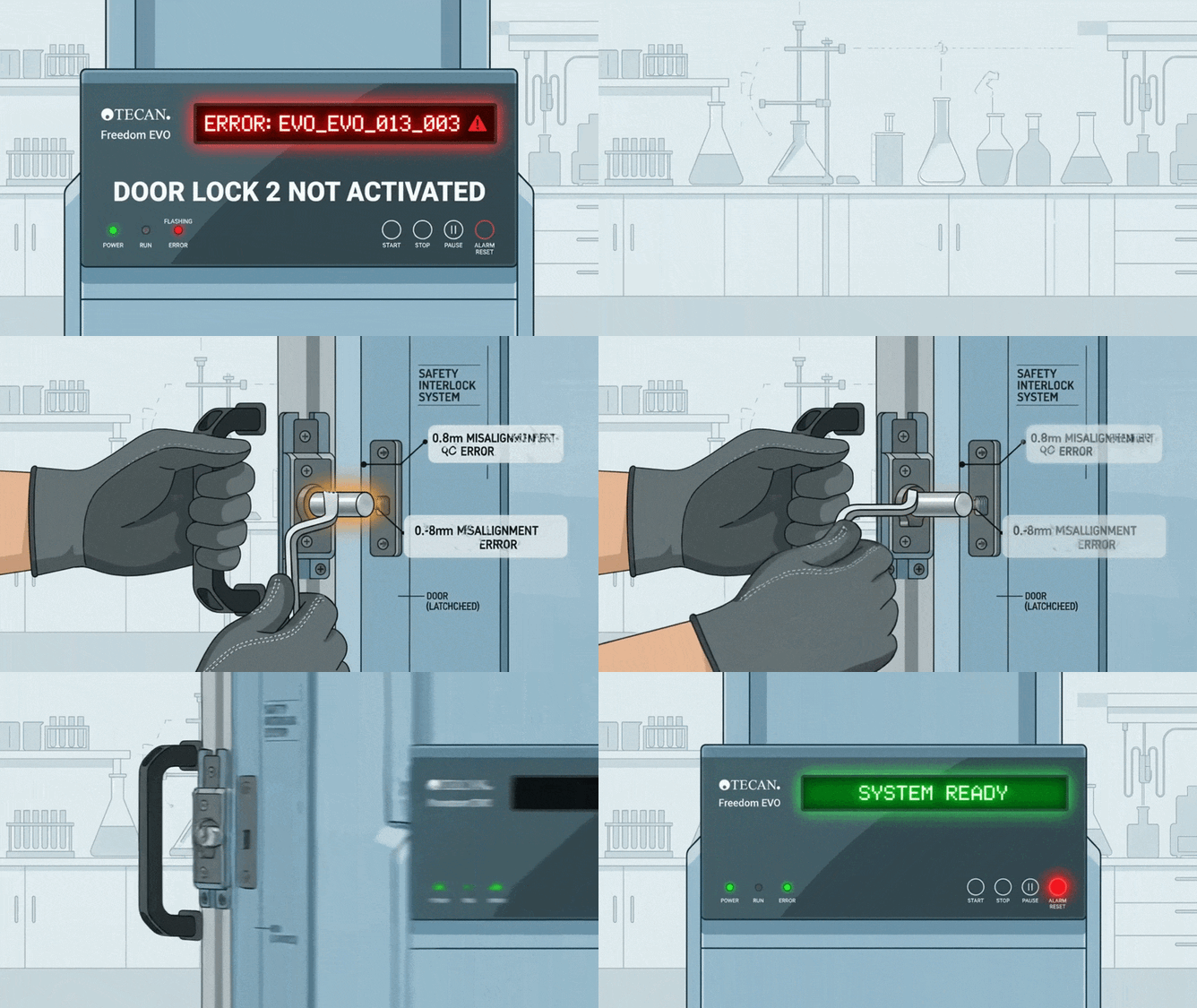
If your [Tecan Freedom EVO](https://seqgen.com/instrument-model/liquid-handler/tecan-freedom-evo/) is currently halted with a "Doorlock 2 not activated" message, follow these steps to isolate the issue:
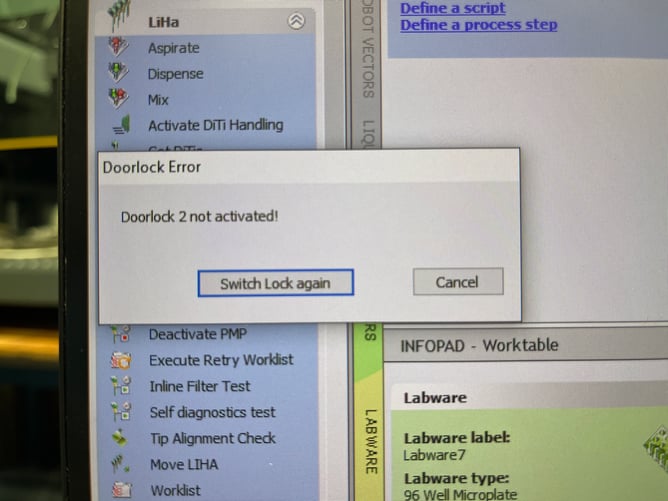
- **Identify the Error:** Look for code **EVO\_EVO\_013\_003** in the software interface.
- **The Manual Fix:** Open and close the door manually to check for simple obstructions.
- **The Mechanical Fix:** Use an **Allen wrench** to loosen the pin hole, realign it with the lock bolt, and retighten.
- **Expert Escalation:** [Contact SeqGen](https://seqgen.com/service-request/) for a full assembly replacement if the internal pin is bent, warped, or damaged.
In the high-throughput world of automated liquid handling, a mechanical "hiccup" in a safety sensor can bring an entire afternoon of research to a standstill. The [Tecan Freedom EVO](https://seqgen.com/instrument-model/liquid-handler/tecan-freedom-evo/) is renowned for its reliability, but even the best hardware requires occasional alignment.
At SeqGen, we know that downtime is the enemy of productivity. We’ve compiled this expert troubleshooting guide to help you resolve the most common Tecan door lock errors without waiting for a service call.
## The Root Cause of Error EVO\_EVO\_013\_003
The "Doorlock 2 not activated" error is a fail-safe. It triggers when the system’s sensors detect that the safety door has not reached its fully "engaged" or "disengaged" state. If the motor meets physical resistance while attempting to move the bolt, it stops immediately to prevent damage to the internal gears.
Common Culprits:
- **Frame Shifting:** Subtle movements in the lab bench or door hinges can cause the pin to hit the edge of the strike plate.
- **Manual Force:** If the door was jarred or opened before the motor finished its cycle, the alignment may have shifted.
- **Hardware Fatigue:** Over time, the internal pin can become bent, preventing a clean entry into the pin hole.
## Step-By-Step Troubleshooting
Step 1. The Manual Alignment Test
Determine if the issue is a simple jam or a hardware failure. Open the door fully and attempt to engage the lock via the software while the door is open.
- **If the bolt moves freely:** Your issue is an alignment problem with the door frame.
- **If the bolt struggles or the error persists while open:** The internal assembly is likely damaged.
Step 2. Realigning the Pin Hole (The Allen Wrench Fix)
Most "Doorlock 2 not activated" errors can be fixed with a minor adjustment:
1. Locate the **Tecan door** on the Tecan frame.
2. Using an **Allen wrench**, loosen the screws holding the pin hole just enough to allow movement.
3. Manually guide the door shut to ensure the bolt enters the *exact center* of the hole.
4. Retighten the assembly and test the lock electronically.
Step 3. Inspecting for Hardware Damage
Check the internal pin for signs of wear. If the metal appears **bent, tilted, or heavily scratched**, it has reached the end of its functional life. A bent pin cannot be reliably straightened; it will likely jam again, potentially causing motor burnout.
## When Should You Contact SeqGen?
While the steps above resolve approximately 80% of routine alignment issues, certain deep-seated hardware failures require professional intervention.
It is time to contact SeqGen if:
- **Persistent Sensitivity:** The error returns shortly after an Allen wrench adjustment.
- **Internal Damage:** The pin is visibly bent or the lock motor makes a grinding sound.
- **System Sync Errors:** The software fails to recognize the door status even when the bolt is physically engaged.
- **Annual PM Requirements:** To prevent these issues before they happen, schedule your annual Preventive Maintenance (PM) or IQ/OQ/PQ certification.
At SeqGen, we specialize in keeping your legacy and high-end Tecan systems running like new. Our goal is to ensure your research never stops due to equipment failure.
## Tecan Doorlock Troubleshooting Cheat Sheet
| **Symptom** | **Common Causes** | **Immediate Action** |
| --- | --- | --- |
| **Intermittent Error ** | Minor misalignment | Realign pin hole with Allen wrench |
| **Grinding Sound ** | Mechanical obstruction | Clean pin hole; check for debris |
| **Code EVO\_EVO\_013\_003 ** | Doorlock 2 not activated | Check pin alignment and door lock functionality |
| **Constant Failure ** | Bent or damaged pin | Contact SeqGen for assembly replacement |
## Technical Support
If troubleshooting steps do not resolve the issue, or for Tecan-specific hardware failures, please contact our technical support team:
- **Website:** [seqgen.com](https://seqgen.com)
- **Service Request:** [seqgen.com/service-request/](https://seqgen.com/service-request/)
- **Email:** [service@seqgen.com ](mailto:service@seqgen.com)
---
SeqGen specializes in the repair, maintenance, and refurbishment of essential laboratory instruments used in DNA sequencing and genetic research. Our expertise covers a wide range of equipment, including DNA sequencers like the [ABI 3730/3730XL](https://seqgen.com/instrument-model/dna-analyzer/abi-3730-3730xl/), [3500/3500XL](https://seqgen.com/instrument-model/dna-analyzer/abi-3500-3500xl/), SCIEX LC/MS mass spectrometers such as the [SCIEX 6500+](https://seqgen.com/instrument-model/lc-ms/api-6500/), [TECAN Freedom EVO](https://seqgen.com/instrument-model/liquid-handler/tecan-freedom-evo/) liquid handlers, real-time PCR systems, thermal cyclers, and microplate readers. With experience in both current and legacy models, SeqGen provides cost-effective solutions at significantly lower prices than leading competitors.
### Written by [Service Team](https://blog.seqgen.com/author/service-team)
Search this site on Google
Search Google
### Subscribe to Email Updates
## [](https://hubspot-cta-redirect-na2-prod.s3.amazonaws.com/cta/redirect/1939955/32eb2ce8-8e54-4e61-ad50-57f6b9b23d18)
### Recent Posts
### Posts by Topic
- [DNA Analyzer (49)](https://blog.seqgen.com/topic/dna-analyzer)
- [Others (42)](https://blog.seqgen.com/topic/others)
- [Crossword Puzzle (11)](https://blog.seqgen.com/topic/crossword-puzzle)
- [3730 Series Genetic Analyzer (10)](https://blog.seqgen.com/topic/3730-series-genetic-analyzer)
- [Tecan Freedom Evo (9)](https://blog.seqgen.com/topic/tecan-freedom-evo)
- [AI 101 (6)](https://blog.seqgen.com/topic/ai-101)
- [Archive (6)](https://blog.seqgen.com/topic/archive)
- [Events/News (6)](https://blog.seqgen.com/topic/events-news)
- [3500 Series Genetic Analyzer (5)](https://blog.seqgen.com/topic/3500-series-genetic-analyzer)
- [LC-MS (5)](https://blog.seqgen.com/topic/lc-ms)
- [Real-Time PCR (4)](https://blog.seqgen.com/topic/real-time-pcr)
- [3130 Series Genetic Analyzer (2)](https://blog.seqgen.com/topic/3130-series-genetic-analyzer)
see all
### Archives
- [July 2026 (1)](https://blog.seqgen.com/archive/2026/07)
- [June 2026 (2)](https://blog.seqgen.com/archive/2026/06)
- [March 2026 (2)](https://blog.seqgen.com/archive/2026/03)
- [February 2026 (2)](https://blog.seqgen.com/archive/2026/02)
- [January 2026 (4)](https://blog.seqgen.com/archive/2026/01)
- [December 2025 (3)](https://blog.seqgen.com/archive/2025/12)
- [November 2025 (1)](https://blog.seqgen.com/archive/2025/11)
- [October 2025 (4)](https://blog.seqgen.com/archive/2025/10)
- [September 2025 (5)](https://blog.seqgen.com/archive/2025/09)
- [August 2025 (1)](https://blog.seqgen.com/archive/2025/08)
- [July 2025 (1)](https://blog.seqgen.com/archive/2025/07)
- [June 2025 (2)](https://blog.seqgen.com/archive/2025/06)
- [May 2025 (1)](https://blog.seqgen.com/archive/2025/05)
- [April 2025 (2)](https://blog.seqgen.com/archive/2025/04)
- [March 2025 (2)](https://blog.seqgen.com/archive/2025/03)
- [February 2025 (2)](https://blog.seqgen.com/archive/2025/02)
- [July 2023 (1)](https://blog.seqgen.com/archive/2023/07)
- [May 2023 (1)](https://blog.seqgen.com/archive/2023/05)
- [April 2023 (2)](https://blog.seqgen.com/archive/2023/04)
- [March 2023 (3)](https://blog.seqgen.com/archive/2023/03)
- [October 2022 (1)](https://blog.seqgen.com/archive/2022/10)
- [September 2022 (1)](https://blog.seqgen.com/archive/2022/09)
- [May 2022 (1)](https://blog.seqgen.com/archive/2022/05)
- [February 2022 (3)](https://blog.seqgen.com/archive/2022/02)
- [February 2021 (1)](https://blog.seqgen.com/archive/2021/02)
- [March 2020 (2)](https://blog.seqgen.com/archive/2020/03)
- [December 2019 (1)](https://blog.seqgen.com/archive/2019/12)
- [November 2019 (1)](https://blog.seqgen.com/archive/2019/11)
- [September 2019 (1)](https://blog.seqgen.com/archive/2019/09)
- [June 2019 (1)](https://blog.seqgen.com/archive/2019/06)
- [August 2018 (1)](https://blog.seqgen.com/archive/2018/08)
- [May 2018 (1)](https://blog.seqgen.com/archive/2018/05)
- [April 2018 (1)](https://blog.seqgen.com/archive/2018/04)
- [March 2018 (1)](https://blog.seqgen.com/archive/2018/03)
- [January 2018 (1)](https://blog.seqgen.com/archive/2018/01)
- [December 2017 (1)](https://blog.seqgen.com/archive/2017/12)
- [November 2017 (1)](https://blog.seqgen.com/archive/2017/11)
- [October 2017 (1)](https://blog.seqgen.com/archive/2017/10)
- [September 2017 (1)](https://blog.seqgen.com/archive/2017/09)
- [August 2017 (2)](https://blog.seqgen.com/archive/2017/08)
- [July 2017 (2)](https://blog.seqgen.com/archive/2017/07)
- [June 2017 (2)](https://blog.seqgen.com/archive/2017/06)
- [May 2017 (5)](https://blog.seqgen.com/archive/2017/05)
- [April 2017 (1)](https://blog.seqgen.com/archive/2017/04)
- [March 2017 (5)](https://blog.seqgen.com/archive/2017/03)
- [February 2017 (4)](https://blog.seqgen.com/archive/2017/02)
- [January 2017 (4)](https://blog.seqgen.com/archive/2017/01)
- [December 2016 (3)](https://blog.seqgen.com/archive/2016/12)
- [November 2016 (3)](https://blog.seqgen.com/archive/2016/11)
- [October 2016 (4)](https://blog.seqgen.com/archive/2016/10)
- [September 2016 (3)](https://blog.seqgen.com/archive/2016/09)
- [August 2016 (5)](https://blog.seqgen.com/archive/2016/08)
- [July 2016 (3)](https://blog.seqgen.com/archive/2016/07)
- [June 2016 (3)](https://blog.seqgen.com/archive/2016/06)
- [May 2016 (4)](https://blog.seqgen.com/archive/2016/05)
- [April 2016 (4)](https://blog.seqgen.com/archive/2016/04)
- [March 2016 (4)](https://blog.seqgen.com/archive/2016/03)
- [February 2016 (30)](https://blog.seqgen.com/archive/2016/02)
see all
## Contact Us
#### SeqGen, Inc.
1725 Del Amo Blvd Torrance, CA 90501
#### +1 877 377 3743
#### +1 800 790 4830
#### [info@seqgen.com](mailto:%20info@seqgen.com)
#### Opening Hours
Monday - Friday: 8:30AM PST - 5:30PM PST
## Social Links
-
-
-
-
SeqGen is an independently owned and operated provider of repair services and refurbished laboratory equipment. Any product names, logos, brands, and other trademarks or images featured or referred to within the SeqGen website and/or on any social media forum are the property of their respective trademark holders or OEMs. These trademark holders are not affiliated with SeqGen or its website. These trademark holders do not sponsor or endorse SeqGen or any of its products or comments. The use of any trade name or trademark is for identification and reference purposes only and does not imply any association with the trademark holder of their product brand.
```json
{
"@context" : "https://schema.org",
"@type" : "BlogPosting",
"author" : {
"@type" : "Person",
"name" : "Service Team",
"url" : "https://blog.seqgen.com/author/service-team"
},
"dateModified" : "2026-03-31T20:12:46.927Z",
"datePublished" : "2026-03-31T13:00:00.000Z",
"headline" : "Troubleshooting the Tecan Doorlock Error: EVO_EVO_013_003",
"image" : [ "https://blog.seqgen.com/hubfs/tecan-door-lock-EVO_EVO_013_003-error.jpeg" ],
"mainEntityOfPage" : {
"@id" : "https://blog.seqgen.com/troubleshooting-the-tecan-doorlock-error-evo_evo_013_003",
"@type" : "WebPage"
},
"publisher" : {
"@type" : "Organization",
"logo" : {
"@type" : "ImageObject",
"url" : "https://blog.seqgen.com/hubfs/SmallLogo-2.png"
},
"name" : "SeqGen, Inc."
}
}
```