When your ABI 3500 Genetic Analyzer displays an “Electrophoresis current unstable” or "Electrophoresis current target above limit" error, it’s more than just a notification—it's a run-stopper. These errors indicate that the Electrophoresis (EP) current is no longer within the safe operating threshold required to move DNA through the capillaries.
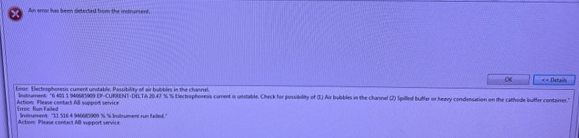
When these errors pop up, the system is halted and won't be able to perform any sample runs. You may see specific system log entries similar to these:
| Error: Electrophoresis current unstable. Possibility of air bubbles in the channel.
EP-CURRENT-DELTA 20.47%. Electrophoresis current is unstable. Check for possibility of (1) Air bubbles in the channel (2) Spilled buffer or heavy condensation on the cathode buffer container.
Action: Please contact AB support service.
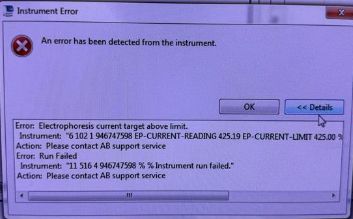
| Error: Electrophoresis current target above limit
EP-CURRENT-READING 425.19 EP-CURRENT-LIMIT 425.00 %.
Action: Please contact AB support service.
While the instrument recommends contacting support immediately, the culprit is usually found within the fluidics system or the state of your reagents.
The Issue: Maintaining Electrical Continuity
EP requires a continuous, stable ionic path from the cathode to the anode. If your buffers are depleted, or if an air bubble or debris has entered the pump block, that electrical path is compromised.
- EP-CURRENT-DELTA (Unstable): Typically caused by air bubbles acting as insulators or moisture/heavy condensation on the cathode buffer container causing arcing.
- EP-CURRENT-READING Above Limit: Based on our experience, this error is caused mainly by degraded polymer. When the polymer breaks down, its conductivity changes, causing the current to spike beyond the instrument's safety limits.
This results in the system halting immediately to protect the capillary array. Before calling for a service visit, it is best to refresh the chemistry and flush the fluidic pathways.
The Solution: A Three-Step Fluidics Refresh
Depending on your immediate reagent availability, you can either try a quick swap or move directly to a system wash.
Step 1: Perform a Full Reagent Swap
If you do not have a conditioning reagent on hand, or want to attempt a rapid fix, start here. We find this resolves the issue about 50% of the time.
- Replace the Polymer.
- Install fresh Anode and Cathode Buffers. Note: Ensure the CBC area is dry and free of condensation or spilled buffer.
- The “Buffer Tilt” Technique: Before peeling the seal on your Anode Buffer, tilt all the liquid into the larger section of the container. This prevents air bubbles from entering the system and breaking the electrical circuit.
Run a test injection. If the current remains unstable or above limit, proceed to deep clean in Step 2.
Step 2: Wash the Pump Chamber and Channels
For a more thorough resolution, many labs choose to start with this step directly—especially if the "above limit" error is present, suggesting degraded polymer buildup.
- Order the Conditioning Reagent: You will need the Conditioning Reagent (Cat. # 4393718) to perform this maintenance.
- Perform the Wash: Once you have the reagent, navigate to the Maintenance tab in your 3500 software and launch the "Wash the pump chamber and channels" wizard.
This formulated reagent flushes the internal pathways—including the pump chamber and channels—to remove any physical obstructions, micro-bubbles, or degraded polymer deposits that could be disrupting the electrical path.
Step 3: Install New Reagents and Reset
Once the procedure is complete, it is vital to install brand-new reagents before attempting your next run. Do not reuse the reagents that were on the instrument during the failed run or the wash process. This ensures the system is primed with fresh, high-conductivity chemistry for a successful restart.
Pro Tip: Check Your Seals! 🧹🧬
When replacing your buffers, always ensure that no fragments of the seal remain on the buffer jars after peeling. Even a small piece of plastic can interfere with the probe's contact or fall into the buffer, leading to the exact current errors you are trying to avoid.
SeqGen specializes in the repair, maintenance, and refurbishment of essential laboratory instruments used in DNA sequencing and genetic research. Our expertise covers a wide range of equipment, including DNA sequencers like the ABI 3730/3730XL, 3500/3500XL, SCIEX LC/MS mass spectrometers such as the SCIEX 6500+, TECAN Freedom EVO liquid handlers, real-time PCR systems, thermal cyclers, and microplate readers. With experience in both current and legacy models, SeqGen provides cost-effective solutions at significantly lower prices than leading competitors.