Key Takeaway: Adopting AI in 2026 is about Information Synthesis. By using Gemini’s reasoning power and specific visual prompts, you can transform dense technical SOPs into intuitive "Sketchnotes" that make complex work "glanceable."
The "Fiction Gap" in AI Adoption
Most people see AI as a tool for "someday." But the real power of AI is removing the friction from your day. We are surrounded by "walls of text"—SOPs, dense briefs, and complex manuals—that take up significant mental energy to process. To make AI feel less like fiction, we use it as a Visual Translator that turns complex information into actionable clarity.
The Master Workflow: From "Wall of Text" to Sketchnote
Whether your procedure is a 2-page Array Cleaning example or a 20-page technical PDF, here is the exact step-by-step method to visualize it using Gemini.
Step 1: Activate the "Reasoning" Brain
Head over to Gemini and ensure "Thinking Mode" is activated. This gives the AI the reasoning power it needs to explain concepts properly rather than just summarizing them.
Step 2: Define the Concept and Audience
Ask Gemini to explain the concept you want to visualize. To get a high-quality result, the explanation must be specific and tailored to your specific audience.
| Prompt 1: Identify and explain [Insert Topic]. Be specific and to the point. Provide relevant examples. Audience is [Define Audience].
Step 3: The "Magic" Visual Prompt
Once Gemini provides the clear explanation, stay in the same conversation and run this exact prompt. This transforms plain text into a professional graphic recording.
| Prompt 2: Create a hand-drawn sketchnote visual summary of these notes. Use a pristine white paper background. The art style should be 'graphic recording' using black ink fine-liners for clear outlines and text. Use colored markers (specifically teal, orange, and muted red) for simple shading and accents. Center the main title in a 3D-style rectangular box. Surround the title with radially distributed simple doodles, business icons, stick figures, and graphs that explain the concepts. Use arrows to connect ideas. The text should be distinct, handwritten, all-caps printing, legible and organized like a professional brainstorming session. Aspect ratio 16:9.
Note: Before you click run, ensure the "Create images" tool is activated.
The Result: From Procedure to Sketchnote
Below is the output generated by following this exact process for a technical Array Cleaning Procedure. What was once pages of text is now a high-impact visual sketchnote ready for the lab bench.
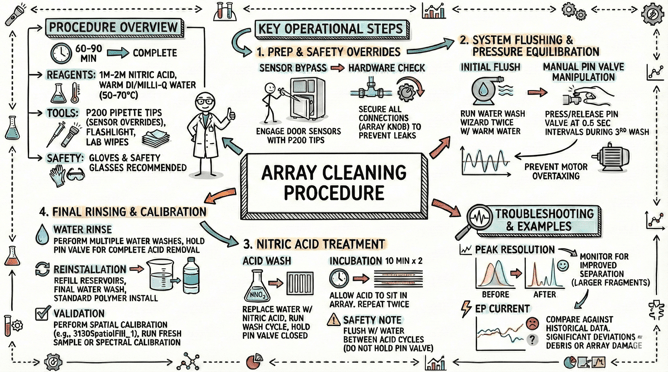
This sketchnote was created by feeding Gemini the Array Cleaning Procedure and using 2 prompts. Notice how it highlights the goal, the 10-minute incubation, and even the "door sensor trick" for easy reference.
- Prompt 1: Identify and explain the attached Array Cleaning Procedure. Be specific and to the point. Provide relevant examples. Audience is DNA analyzer lab tech.
- Prompt 2: Create a hand-drawn sketchnote visual summary of these notes. Use a pristine white paper background. The art style should be 'graphic recording' using black ink fine-liners for clear outlines and text. Use colored markers (specifically teal, orange, and muted red) for simple shading and accents. Center the main title in a 3D-style rectangular box. Surround the title with radially distributed simple doodles, business icons, stick figures, and graphs that explain the concepts. Use arrows to connect ideas. The text should be distinct, handwritten, all-caps printing, legible and organized like a professional brainstorming session. Aspect ratio 16:9.
Scalability: From 2 Pages to 20
The most powerful part of this workflow is its versatility. You aren't limited to short notes:
- The 20-Page PDF: Upload a massive technical manual and run the same prompts to get a "Cheat Sheet" summary.
- The YouTube Deep-Dive: Feed Gemini a link to a training video and turn it into a visual study guide instantly.
Real Work, Real Results
AI isn't about replacing your expertise; it’s about liberating it from the page. By turning dense manuals into visual guides, you create a culture where information is accessible, safety is visual, and the "fiction" of AI becomes a practical daily tool.
Welcome to the SeqGen Lab AI 101 Guide. This series shares practical insights, tutorials, and real examples of how AI tools can enhance lab workflows and scientific research. We hope you find these posts helpful in applying AI to your work. Stay tuned — more content, case studies, and actionable tips are on the way.
SeqGen specializes in the repair, maintenance, and refurbishment of essential laboratory instruments used in DNA sequencing and genetic research. Our expertise covers a wide range of equipment, including DNA sequencers like the ABI 3730/3730XL, 3500/3500XL, SCIEX LC/MS mass spectrometers such as the SCIEX 6500+, TECAN Freedom EVO liquid handlers, real-time PCR systems, thermal cyclers, and microplate readers. With experience in both current and legacy models, we provide cost-effective solutions at significantly lower prices than leading competitors.